
By Gregg Smith
A fish finder visor adds shade around your display. Start with the full model name on your Garmin—not just the screen size. Here is a practical checklist for choosing the Sonar Shield bolt-on visor listed for ECHOMAP UHD and UHD2 93sv displays.
Shop the Garmin ECHOMAP UHD & UHD2 9-inch visor →
Three details to check before ordering
- Exact display: record the complete model name, including UHD or UHD2 and 93sv.
- Mount arrangement: take a rear photograph showing the bracket, attachment points and nearby equipment.
- Screen cover: note whether you use the original Garmin screen cover.
Keep those details handy when comparing the listing or asking a fit question. Two displays casually described as a nine-inch Garmin should not automatically be treated as the same accessory fit.
Shade that works with your setup
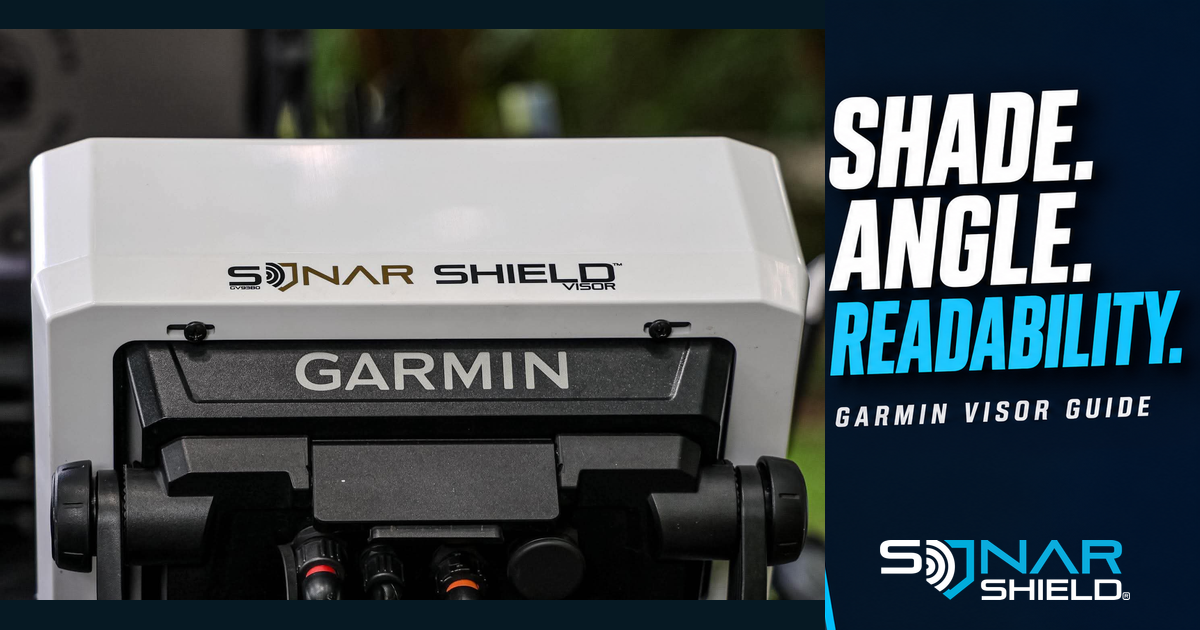
The current listing describes an injection-molded visor that bolts to the back of the supported display and works with its OEM screen cover. Its overhang adds shade that can reduce glare. The result varies with sunlight direction, display angle and your viewing position.
The real installed photograph shows the product and rear mounting arrangement. The white finish is a library example; consult the current listing for available colors and options.
Compare the view from where you fish
After fitting the visor according to its supplied instructions, look at the display from your normal fishing position. With the boat stationary, compare the viewing angle in bright light. Make one small adjustment at a time so you can tell whether the angle or shade is helping.
Keep the screen readable for the information you need. There is no single brightness percentage that suits every trip, and adding shade does not change the sonar return.
Keep your screen cover in the routine
The visor surrounds the display while you view it. The OEM cover goes over the screen when appropriate for storage or transport under Garmin’s instructions. The listing describes OEM-cover compatibility; check that the cover seats normally in your actual installation.
A useful question before you buy
Ask: Does this match my exact display and the way I use it? Include your model name, mount style and screen-cover use. If your setup differs from the listing, send Sonar Shield the model information and photographs for a specific fit answer.
Shop this setup
Sonar Shield Garmin ECHOMAP UHD & UHD2 9 Fish Finder Visor
See the current model description, colors and availability, then choose the matching option.
Another display? Browse fish finder visors and match your exact model. For help, email sales@thesonarshield.com with your display and mount details.
Product information checked September 30, 2026 against the linked Sonar Shield listing. Photograph from Sonar Shield’s library. The comparison exercise is editorial guidance, not a claim of field testing or guaranteed visibility.
