
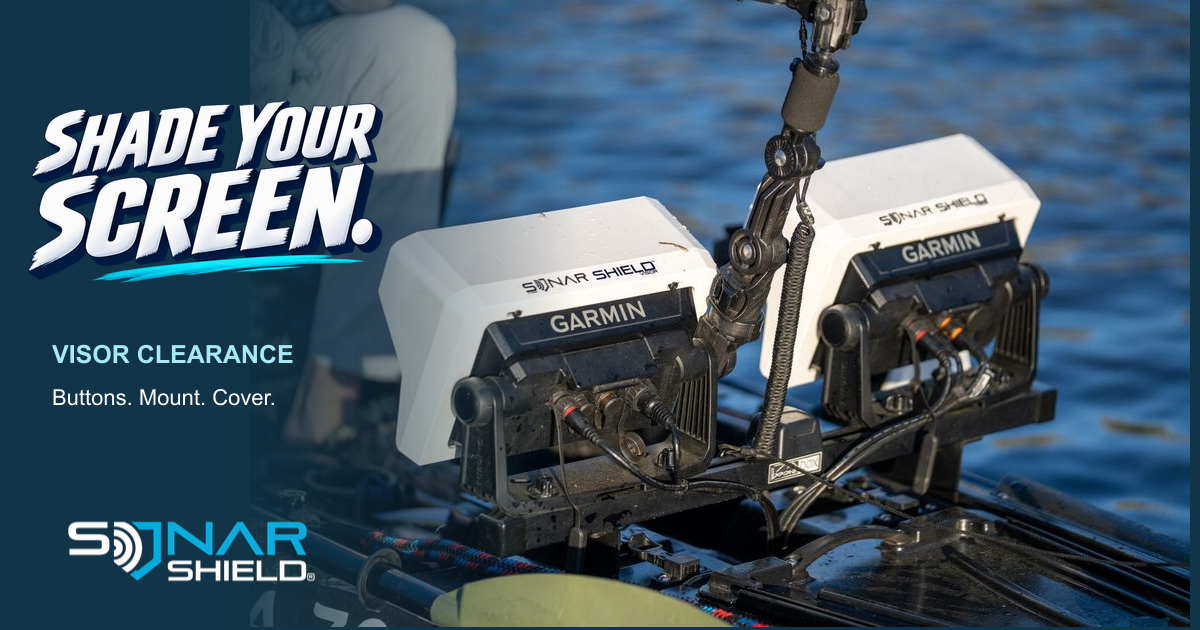
A fish finder visor adds shade around the screen, but a good setup also leaves room to reach the controls, adjust the mount and remove the display cover. Before your next trip, check the complete arrangement from your normal fishing position. The close-up photograph shows real Sonar Shield visors on a kayak; it is not a fit guarantee for an unidentified Garmin model.
Start with these three clearance checks
- Controls: Can you comfortably reach the power button, keys and screen edges you use?
- Mount: Can the display move through the positions you actually need without the visor contacting another device, a rail or a cable?
- Cover: Does your removable display cover seat correctly in the configuration specified by the accessory instructions?
These are Sonar Shield’s suggested inspection steps. Follow the installation directions for your exact visor, display and mount. Stop if anything needs force to fit.
Check it from the seat, then from your standing position
A tidy-looking installation at the ramp can feel different once you sit down with a rod in hand. Place the boat or kayak securely on land, put the screen in its usual position and check your sightline. On setups used both sitting and standing, inspect both positions. The objective is to keep the whole useful screen visible without creating an awkward reach.
Look at the display from each side, too. Leave enough room for the tasks you perform most often: moving between views, adjusting range or reaching a physical key. A visor cannot correct an inconveniently placed display or substitute for adjusting the mount.
Move the mount deliberately
With the equipment supported, follow the mount manufacturer’s adjustment procedure. Watch the corners of the visor, nearby electronics and cable exits as the unit changes position. Check the stowed position separately from the fishing position. Do not use a cable as a movement stop, and do not assume clearance at one angle means clearance at every angle.
If a position creates contact, reconsider the arrangement before use. Avoid trimming, bending or modifying the visor to make an uncertain fit work; first confirm that you selected the correct product.
Check the cover as a separate part
The visor and the removable display cover do different jobs. Read the exact product instructions to establish whether the cover can be installed with that visor in place. If removal is required, build it into your routine. Never force a cover beneath a visor lip or assume a partially seated cover is secure.
A graph-cover strap is another accessory with its own fit requirements. It helps retain a cover; it is not a substitute for the display mount or for properly seating the cover.
Order by the complete model name
Write down the brand, model, generation and screen size before shopping. Compare those details with the listing and any stated exclusions. If the product page does not identify your model, ask about fit before ordering. Our cover-versus-visor guide explains the different parts of an electronics protection setup.
Which clearance issue has mattered most on your rig: buttons, the mount or the removable cover?
Explore Sonar Shield gear
The photographed products are fish finder visors. Choose your exact model in the visor collection; add a graph-cover strap when it suits your separate travel-cover setup.

Fishing Graph Cover Strap
Help retain your display cover during travel and storage. Review Single, Twin and XL options and confirm fit for your equipment.
Fish finder visors
Browse by your exact display model for shade around the screen while you fish. Model and generation matter; a screen size alone does not establish compatibility.
See the store for current prices, options and availability. These links do not imply universal compatibility.